 sluglist
Feedback that ends in a diff
Anyone reports a bug on the running app — a client, a tester, a customer, or a QA agent driving a browser. It lands as a folder of plain files. Your coding agent reads it, fixes the code, and re-tests until the checklist is green.
Build
your change
Test
in a real browser
sluglist status
another round?
Resolved
report handed over
↺ still failing → back to Build
- v1.18.0
- MIT licence
- 2 dependencies
- no account, no server
- 4 Claude Code skills
Live
Try it on this page
The widget is already mounted here. Report something — the launcher is in the bottom-right corner, or press Shift+F — and the artifacts it produces appear below, exactly as they would land in your project’s folder.
The standard
One contract, humans and agents on both ends
Feedback travels from whoever found the problem to whoever fixes it. sluglist fixes the shape of what travels — a folder of plain files, versioned and documented — so the two ends can be a client and a developer, a customer and an agent, or two agents, without anything in between having to change.
Whoever finds it
reports
- A client signing off a release
- A PM or tester walking a checklist
- A customer hitting a bug in production
- You, on your own laptop
- A QA agent driving a real browser
The artifact contract
a folder of plain files
session-2026-08-16-a1b2/
  session.yaml
  01-save-does-nothing.md
  01-save-does-nothing.png
  fixes.yaml
Versioned, additive-only, documented field by field.
Whoever fixes it
resolves
- A developer opening the report
- Anyone the single-file HTML gets forwarded to
- A fix agent that localizes and patches
- Any script that can read files
Scenarios
Pick the one that matches you
Click the bug on localhost, have it land in a folder, let your agent fix it.
import { LocalConnector } from "sluglist";

mountFeedbackWidget(
  createFeedbackWidget({
    connectors: [new LocalConnector()],
  })
);
// then: npx sluglist devStaging plus a checklist of what shipped. They walk it and flag problems; you get a coverage map.
createFeedbackWidget({
  project: "acme",
  connectors: [new HttpConnector(url, token)],
  checklist: "/checklist.json",
});A "Report a problem" button for production: PII masked and scrubbed, delivery through an endpoint you own.
createFeedbackWidget({
  project: "acme",
  preset: "production",
  connectors: [new HttpConnector(url, token)],
  identity: { userId: user.id, email: user.email },
});A QA agent walks the checklist in a browser, a fix agent answers it, and the loop runs until green.
npx sluglist init --agents-md

# then, to your coding agent:
#   "QA this branch and fix everything until it passes"
npx sluglist status --json
Each one, with the benefits and the exact setup: the four use cases.
Works with Claude Code
Feedback that fixes itself
Skip the dashboard and the ticket queue. Feedback clicked on a page lands in a local folder as clean artifacts, and a coding agent reads it, finds the code, and fixes it — the report goes straight to a diff.
Run the sidecar
Start npx sluglist dev next to your dev server. It binds 127.0.0.1 and writes reports into a local .sluglist/ folder — browser JS can’t touch disk, so this tiny process does.
Click feedback
Report a bug with the widget while you use the app. The full artifact set — screenshot, comment, CSS selector, page errors and a trail of action frames — lands in the folder.
Let the agent fix it
Install the skills once with npx sluglist init-skills, then tell Claude Code to “read feedback and fix it.” The skill reads each issue, localizes by selector and frames, fixes the code, and writes a .done report.
$ npx sluglist dev
sluglist dev listening on http://127.0.0.1:4477
writing feedback to ./.sluglist
waiting for reports (Ctrl+C to stop)…
  ← session-2026-07-23-a1b2/01-save-does-nothing.png   (48 KB)
  ← session-2026-07-23-a1b2/01-save-does-nothing.md    (612 B)
← session-2026-07-23-a1b2/session.yaml (1.1 KB)$ claude
› read feedback and fix it
● Reading .sluglist/session-2026-07-23-a1b2 …
01 — Save button does nothing · button[aria-label="Save"]
frames 02→03: save clicked, no response · PATCH 500 in ## Errors
● Fixed src/api/animals.ts + AnimalForm.tsx
● Wrote …/session-2026-07-23-a1b2/.done…/.done — the agent’s report
# session-2026-07-23-a1b2 — done

## 01 — Save button does nothing
- files: src/api/animals.ts, src/forms/AnimalForm.tsx
- fix: the PATCH sent the record id in the body, but the route
  reads it from the URL — the handler threw on `undefined.id`.
  Moved the id into the path and guarded the response.
  Save persists and shows the success toast now.
Agent to agent
Or hand over the whole cycle — until it’s green
The tester can be an agent too. One walks the checklist in a real browser and writes down what it saw; another reads those artifacts and fixes the code; a re-test round checks the fixes. Neither is trusted: every verdict carries evidence, and a third command decides whether another round is worth running.
- 1
Checklist
A branch diff, your routes, or a written brief becomes a list of client-voice checks.
.sluglist/checklists/release-2026-08.json
- 2
QA run
Each item is walked in a real browser. No fail without a screenshot, no pass without performing the check, honest “not tested” instead of a guess.
session.yaml · NN-issue.md · NN-issue.png
- 3
Report
One self-contained HTML file: verdicts, the fact observed behind each one, every screenshot inlined.
report.html
- 4
Status
The decision point, read from the artifacts rather than from an agent’s memory of what it just did.
npx sluglist status --json
- greendone — hand over the report
- stalled / blockedstop — a human takes it
- continueanother round ↓
- 5
Fix
The failing issues are localized and patched, each one recorded as fixed, wontfix or needs_info.
fixes.yaml
- 6
Re-test
A checklist of only the fixed items, ids preserved, provenance back to the round it answers — then back to step 2.
checklist.retest.json → round 2
$ npx sluglist status

release-2026-08 · branch · 12 items
  1  session-2026-08-16-a1b2  9 pass · 3 fail · 0 not tested  ·  2 fixed, 1 wontfix
  2  session-2026-08-16-c3d4  2 pass · 1 fail · 0 not tested  ·  no fix pass yet

  still failing (1)
    csv-columns — for the next fix pass · failed in 2 rounds · issue 02

verdict: stalled — 1 item failed in 2 or more rounds
npx sluglist status is derived entirely from the artifacts on disk — the verdicts, the fix records, and the chain linking round 2 back to round 1. It answers the one question an agent should never answer from memory: is my own work done?
An item that already survived a fix pass goes to a human instead of being ground on for another round — and the loop is forbidden to reach green by editing a check or writing it off. Full protocol: the autonomous QA loop.
Single-file HTML proof
One command, one file you can send
A session folder is the machine-readable truth — but it is not something you email a client. npx sluglist report renders it as an article: what passed, what failed, and the fact observed behind each verdict, with every screenshot inlined.
Nothing is fetched when it opens — no stylesheet, script, font or image. It works from file:// with the network off, and Print → Save as PDF gives a clean document.
It reads as an article: a heading, three tags, the reporter’s own words — with the metadata and the 25-step action trail folded into one spoiler. --all --since gathers a week of feedback into a single file, ordered by when each report was written.
$ npx sluglist report

session-2026-08-11-2elz
  → …/session-2026-08-11-2elz/report.html  (146.0 KB)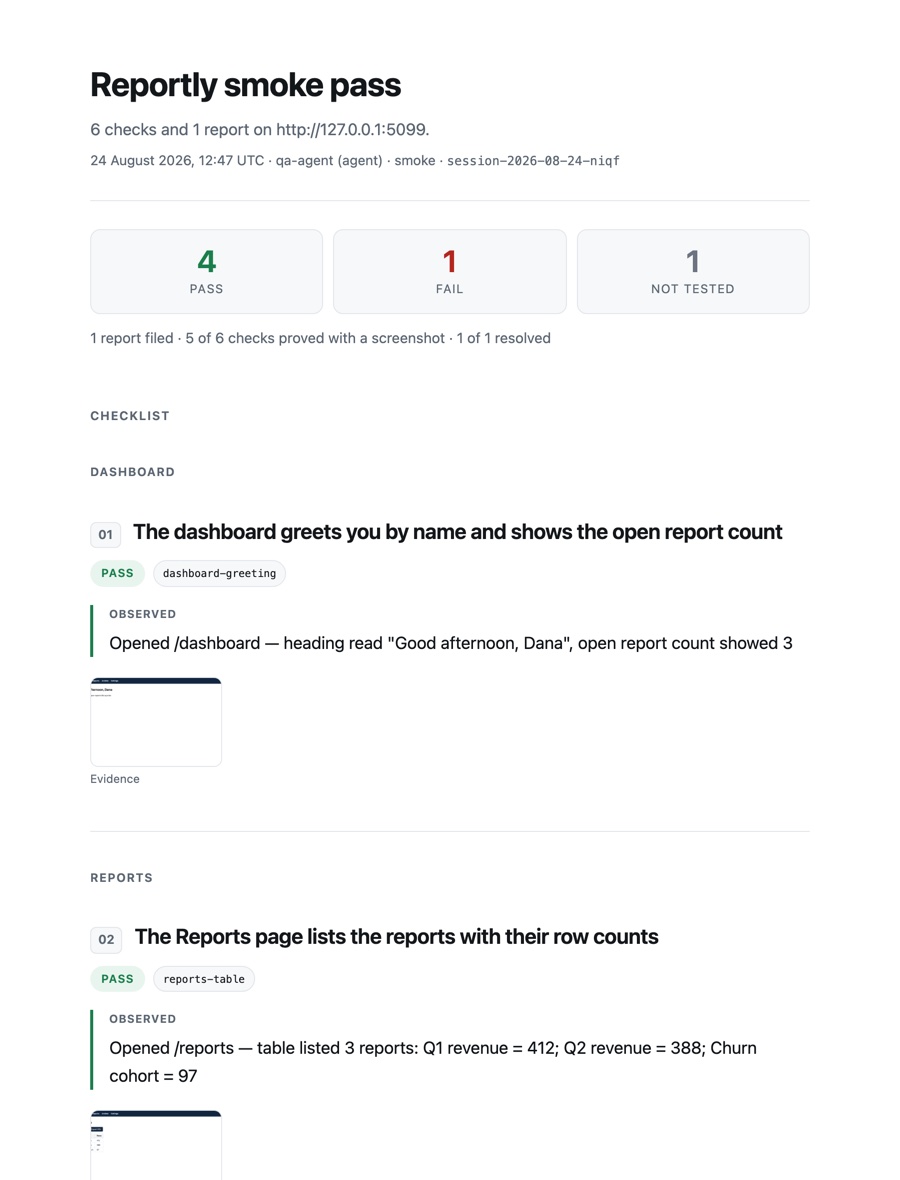
Works with any agent that can read files. Claude Code is supported out of the box via the bundled sluglist-fix skill. Full guide: sluglist for Claude Code & coding agents.
Install
Quick start
import {
  createFeedbackWidget,
  mountFeedbackWidget,
  DownloadConnector,
} from "sluglist";

mountFeedbackWidget(
  createFeedbackWidget({
    connectors: [new DownloadConnector()],
  })
);
One line of config: a connector, and nothing else. That is a complete widget — launcher, capture modes, annotation, error and action capture, the offline outbox, a project slug taken from your hostname. Everything else is optional.
Gate it behind an env flag so the code never initializes in production. It ships as ESM and CJS, and html-to-image loads lazily on the first capture — nothing in your initial bundle. Full setup: the quick-start guide.
In the box
Everything else, one click away
Four capture modes
Pick an element, drag an area, grab the whole scrollable page, or record a flow as numbered frames.
Annotation
Arrow, box and text over the screenshot, with colour, undo and keyboard shortcuts — flattened at full resolution.
Smart selectors
data-testid → id → aria → landmark path, plus a React component hint. Never a Tailwind utility or a hashed class.
Errors and an action trail
Recent console errors, exceptions and failed requests, plus what the reporter did before the click — never what they typed.
Checklist mode
Pre-seed an acceptance list; every verdict lands in session.yaml as a coverage map — pass, fail, or never checked.
Pluggable connectors
The core never knows about storage. Deliver anywhere through a two-method interface; fan out to several at once.
PII masking and scrubbing
Inputs redacted in the screenshot; emails, long digit runs and tokens scrubbed out of every text surface.
A production preset
One line turns on masking, screenshot consent, text scrubbing and a dismiss ✕ for real users.
A stable artifact format
A folder per session: session.yaml plus one markdown file per issue. Versioned, and only ever extended.
Agent skills and a CLI
dev, report, status, init — and four Claude Code skills that run the loop from checklist to green.
Project conventions
One committed file holds your base branch, how to run and sign in, hard limits and loop budget.
Framework-agnostic
Zero UI framework, style-isolated in a shadow DOM, an offline outbox, and it never breaks the page it is on.
Reference
Configuration
| Option | Type | Description |
|---|---|---|
| project | string | Slug written into session.yaml. |
| connectors | FeedbackConnector[] | Delivery targets; runs them all. |
| enabled | boolean | Gate on env; skip where you don't want it. |
| preset | "dev" | "beta" | "production" | Privacy, scrub and dismiss defaults. |
| privacy.scrubText | boolean | Redact PII from artifact text (on in production). |
| dismiss | { enabled, days } | ✕ on the launcher; ui.show() brings it back. |
| offlineQueue | boolean | IndexedDB outbox + retry (default on). |
| container | HTMLElement | Mount target (default document.body). |
| shortcut | string | false | Toggle key (default "Shift+F"). |
| position | "bottom-left" | "bottom-right" | Button corner. |
| accentColor | string | Accent for primary actions. |
| categories | { key, label }[] | Triage chips; [] hides them. |
| onIssueCaptured | (result) => void | Fired after each capture. |
| strings | Partial<Strings> | Override any UI text (i18n). |